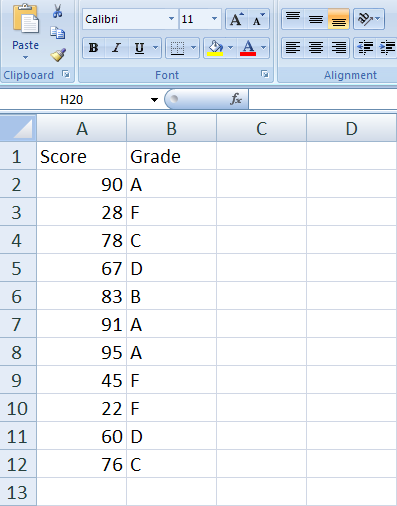
While considering the spreadsheet above, think about the function that might be used to produce the results, (A,B,C,D and F), in the grade column. Last week we created an IF statement to produce either a "Pass" or a "Fail". We agreed that only two possibilities existed because only three arguments are allowed in the IF function -
- The question (or condition)
- The yes (or true)
- The no (or false)
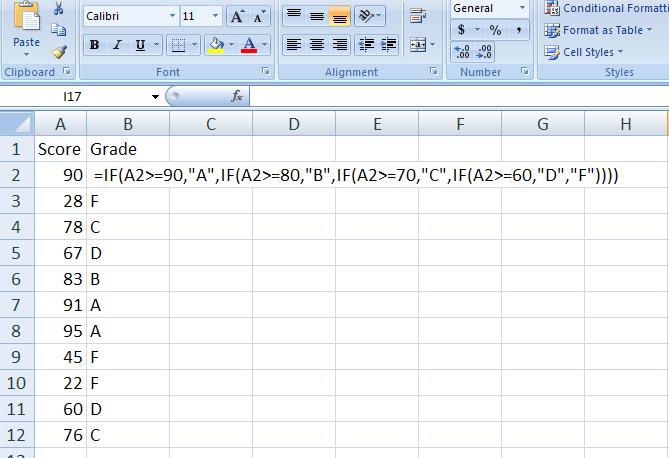
Don't freak out. It's not as bad as it looks. But let's get the technicalities out of the way first. Notice that text is always in quotes and numerics are never in quotes!
Expanding the simple IF statement from previous discussions, we create a Nested- IF statement to be able to offer a set of choices, other than just two. The simple IF allowed for only two options: =IF(A1>60,"PASS","TRY HARDER") Now, by embedding the simple IF and still following the rules of question first, then yes option, then no option, we get this:
=IF(A2>=90,"A",IF(A2>=80,"B",IF(A2>=70,"C",IF(A2>=60,"D","F"))))
To better understand this, read the formula like this in plain English:
If A2 is greater than or equal to 90, then give an "A", otherwise, if A2 is greater than or equal to 80 then give a "B", otherwise, if A2 is greater than or equal to 70, then give a "C" etc. I think of this as if if you were sitting with me across the table helping me grade. I would say to you, "do they have a score of greater or equal to 90?" and if you say "yes" then we give an "A", otherwise I ask you again, "do they have a score of greater than or equal to 80?" and so on. A process of elimination, since with an IF statement, I can only ask a yes or no question - like a game.
The reason why this works at all is because of the way Excel approaches the nested IF. What I mean is that at some point it would occur to you that the questions should be "is their score greater than 70 AND less than 80, then give them a "C". Right? Notice we never set a lower and upper limit in our question. We could do this because there is such a thing as AND in Excel but why make it any more complicated?
It works without the need for greater than AND less than, because It reads, like us, from left to right. (I mean like us in western culture. And yes, my Hebrew and Arabic Excel course is different
 ). But not only does it read form left to right, it stops reading as soon as there is a "yes" to the question! So If we ask, "is it greater than 90" and the answer is no,
the next question doesn't have to be "is it greater than 80 AND less
than 90"! Because if it were greater than 90, the procedure would have
stopped and the grade of "A" would be entered. So obviously it is less
than 90 if it is reading the second question. It only continues to read
the IF, when the answer is no to the question!
). But not only does it read form left to right, it stops reading as soon as there is a "yes" to the question! So If we ask, "is it greater than 90" and the answer is no,
the next question doesn't have to be "is it greater than 80 AND less
than 90"! Because if it were greater than 90, the procedure would have
stopped and the grade of "A" would be entered. So obviously it is less
than 90 if it is reading the second question. It only continues to read
the IF, when the answer is no to the question!Note that the closing parentheses do not appear until the very end, when the no option is finally entered. The reason for this is that you can only close the parentheses when you are done with a function (any function), and in our case, we can't seem to get done because every time we get to the no part of the IF statement, we ask yet another question, which needs to have its own yes and no! The completed formula doesn't end until we finally enter a no statement.
Don't get Carried Away
Sometimes we get carried away with all the questions and just don't know when to stop. Here is a common mistake:
=IF(A2>=90,"A",IF(A2>=80,"B",IF(A2>=70,"C",IF(A2>=60,"D",IF(A2<60,"F",??? ))))
We are going along fine with our questions and then we get to the "F" part and ask if the score is less than 60, give an "F", and then we get stuck on the otherwise part. Remember every IF must have a question, and a yes, and a no! So what would you put for the no in this case? When this happens, it just means you have asked one question too many. Just back it up and do it as in the correct one shown previously.
How many Parentheses?
Count the number of IF statements you used and type that many closing parentheses.
Does the Order of Questions Matter?
Yes! Consider the same IF statement written backwards:
=IF(A2>=60,"D",IF(A2>=70,"C",IF(A2>=80,"B","A"))) - Although the formula is not complete, since there is no "F", there is enough here to prove my point. What grade would the student who has a 95 in A2 get? Yes, You are correct. They would get a D! why? Because 95 is greater than 60! The first question wins!
You should try out these formulas just to get the hang of writing such long formulas before attempting this week's project.
.See you in class!
Terry