Introduction Continued
Contents
In this section we shall study various topics such as classes, memory, garbage collection, primitive types. We gain a basic understanding of the inner workings of Java. Below is the same "HelloWorld.java" that we looked at earlier.
Structure of a Java Program
File: HelloWorld.java
public class HelloWorld
{

    public static void main(String[] args)
    {
        System.out.println("Hello, World");
    }

}
We ran the "HelloWorld.java" program previously.
The statement:

public class HelloWorld
{
creates a class. A "class" is our own type and if want
we can create objects of that type just as
we create objects of a primitive type. A class can have data members
and methods. In this example
we did not actually create an object of "HelloWorld" in our
program ourselves. The "public" controls the access level of the class.
The word "public" in this example signifies that the class can
be accessed from anywhere. The other option in the above case is to
take "public" out and that means the class has default or package access.
We can have other ".java" files in the same folder ( same package ) or other
folders ( different package ). There can be only 1 public class in a single
".java" file. And the name of the file must match the name of the "public" class.
Exercise 1):Why did Java make this rule ? A large Java program like any other large program will be composed of many files. Now if we look at the file names we can get an idea of the class it holds. It must have the same name as the file.
1) Try renaming the file "HelloWorld.java" to "Hello.java" and try to compile and run the program. You should get output as: C:\WebSite\Learn\2\Java\intro>javac Hello.java Hello.java:2: error: class HelloWorld is public, should be declared in a file named HelloWorld.java public class HelloWorld ^ 1 error
The "java/class" files themselves can be organized in a hierarchical folder structure. A subfolder stores a class file which declares that it is inside a package. The package name should correspond to the folder or the path that the class resides in. Java will use an environment variable called "CLASSPATH" to search for the packages and the class files.
Let's look briefly at the concept of package. We are going to create 2 files: "UseMyMath.java" and "Addition.java". The file "UseMyMath.java" resides in our main source folder. We have another subfolder in it called "mymath". That is where we place the file "Addition.java" .
File: UseMyMath.java
import mymath.* ;


public class UseMyMath
{

    public static void main(String[] args)
    {
        System.out.println(  Addition.Add2Nos( 2 , 5 )   )  ;
    }

}
File: mymath/Addition.java
package mymath ;


public class Addition
{

    public static int Add2Nos(int x1, int y1 )
    {
        return (x1 + y1) ;
    }

}
The folder structure is as follows: SourceFolder: UseMyMath.java --File mymath --Folder Addition.java --File We have stated "package" in the file line as: "package mymath ;" . We are stating that the file belongs to the package "mymath". The folder is also named "mymath". In the "UseMyMath.java" we want to use this class so we use the "import" statement "import mymath.* ;" . This states that bring all the ".class" files that in the package mymath.
We then use "javac" to compile the file and run it.
C:\WebSite\Learn\2\Java\intro\mymath>javac Addition.java

C:\WebSite\Learn\2\Java\intro>javac UseMyMath.java

C:\WebSite\Learn\2\Java\intro>java UseMyMath
7
How does "javac" work in the above example. It will look up the "CLASSPATH" enviornment variable. That has not been set in our case. The "CLASSPATH" will contain a set of folders where the "javac" will look for our classes. In the above case it looks in the current folder for the subfolders corresponding to the package names. It checks for a subfolder called "mymath" and the finds the class "Addition" and uses it.
CLASSPATH Info:
On Windows the paths are separated by ":" and on
Mac they are separated by ";" .

To view classpath info in Windows.
echo %CLASSPATH%
To view classpath info in Mac.
echo $CLASSPATH

To set classpath in Windows.
set CLASSPATH=".:/somepath/"
To set classpath in Mac.
CLASSPATH=".:/somepath/"


To remove classpath in Windows.
set CLASSPATH=
To remove classpath in Mac.
unset CLASSPATH
Exercise 2):
Follw the below steps:

Create a new folder on your "C:" drive. It can be any folder.
I am creating the folder "MySource" on the "C:\" . Copy the
"UseMyMath.java" to that folder and try to compile the file.
We should get an error of the following form:

C:\MySource>javac UseMyMath.java
UseMyMath.java:1: error: package mymath does not exist
import mymath.* ;
^
UseMyMath.java:9: error: cannot find symbol
        System.out.println(  Addition.Add2Nos( 2 , 5 )   )  ;
                             ^
  symbol:   variable Addition
  location: class UseMyMath
2 errors

What happened in this case. The "javac" compiler will look at the folders
in the "CLASSPATH" . And then look in the current folder for the subfolder
"mymath" but does not find it. Somehow we need to tell it to look
in the folder "C:\WebSite\Learn\2\Java\intro" where the "mymath" folder
resides. We can specify that in the classpath and there are 2 ways of
doing it. One way is to do it in the "javac" command.

We can use "-classpath" but usually the short hand "-cp" is
used.

C:\MySource>javac -cp "C:\WebSite\Learn\2\Java\intro" UseMyMath.java

C:\MySource>java -cp "C:\WebSite\Learn\2\Java\intro" UseMyMath
7

If we do want the "javac" to look in the current folder for the
subfolder/packages then the "-cp" option will not do that
by default and we need to explicitly state that. If the CLASSPATH
has not been set then the "javac" will look in the current
folder but if the CLASSPATH has been set then it will not do that
by default and we need to place the current folder "." in the
CLASSPATH. If our path has spaces in it then we should place
double quotes around the paths.

javac -cp ".;C:\WebSite\Learn\2\Java\intro" UseMyMath.java

The 2nd way to is to place the path in the "CLASSPATH" variable.

set CLASSPATH=.;C:\WebSite\Learn\2\Java\intro

javac UseMyMath.java
java UseMyMath

We can specify multiple paths in the "CLASSPATH" variable by separating
the paths with a semicolon and on Mac systems with a colon. We can also
place the statement in a batch file.
If we want to use folder.subfolder kind of scheme then we use the
same procedure. As an example:
Under "mymath" folder we create another sub folder in it say "trig".
Inside this folder we create our Java file as "Sine.java"

So the folders look like:


C:\WebSite\Learn\2\Java\intro
                             UseMyMath.java

                             mymath
                               Addition.java

                               trig
                                 Sine.java

The file "Sine.java" will have the following header:

package mymath.trig ;

The "UseMyMath.java" will have the statements:

import mymath.* ;
import mymath.trig.* ;

We need the first import because our "Addition.java" file
resides in that folder.
So now we understand how a Java program's structure works.
In order to make the ditribution process easier we have the concept
of "Jar" files. This is like a zip file that contains multiple
files. A zip file can also have path information in it and this
is used by Java to specify the package/paths. We are now going
to use the "jar" concept to bundle the "mymath/Addition" class and
then use the "Jar" file in our "UseMyMath.java" program.
We go to the folder "C:\WebSite\Learn\2\Java\intro>" This contains the "mymath" sub folder. We create the "jar" file using the command: C:\WebSite\Learn\2\Java\intro>jar -cvf mymath.jar mymath\*.class We can print information about the "jar" file using the command "jar tf". The jar file is actually a zip file and can be opened with "Winzip" on Windows. C:\WebSite\Learn\2\Java\intro>jar tf mymath.jar META-INF/ META-INF/MANIFEST.MF mymath/Addition.class The manifest file contains information about the jar file. In our case it contains. Manifest-Version: 1.0 Created-By: 1.8.0_341 (Oracle Corporation) The "1.8.0_341|" is the version that class files were created with. We can copy the jar file to the C:\MySource folder from before: C:\MySource>dir Volume in drive C has no label. Volume Serial Number is 903D-2B35 Directory of C:\MySource 01/31/2026 03:15 PMThis is how Java programs are distributed with jar file. The jar file can be thought of a folder with subfolder as paths in the jar file.. 01/31/2026 03:15 PM .. 01/31/2026 03:13 PM 679 mymath.jar 01/31/2026 11:10 AM 441 UseMyMath.class 01/31/2026 10:34 AM 178 UseMyMath.java 3 File(s) 1,298 bytes 2 Dir(s) 175,504,797,696 bytes free Now the "UseMyMath.class" file needs the "Addition" class in the package "mymath". The path "mymath" is specified in the entry for the "Addition" class in the "mymath.jar. Now all we do is place the "mymath.jar" on the class path so that "UseMyMath" can access it. C:\MySource>javac -cp ".;./mymath.jar" UseMyMath.java C:\MySource>java -cp ".;./mymath.jar" UseMyMath 7
Exercise 3):


Remove the existing classpath variable in windows with
the below command.
SET CLASSPATH=;

For Mac use
unset CLASSPATH

Create a folder on your system ( any folder ) . Copy the
"UseMyMath.java" and "Addition.java" in it. Remove the
"public" , import and package statements from the top
of the files. Now compile the files and try to run
"UseMyMath". Does it work ? Explain the logic of what's going
on internally.

Exercise 4):

Work with the files created in Exercise 3 .
Move the file "Addition.java" to a subfolder called
"mymath" . Do not make the "Addition.java" public and make
sure there is no "Addition.java" in the main folder.

Example for a folder named 2:
    2
      UseMyMath.java
      mymath
          Addition.java

Compile the 2 files. Go to the "2" folder
and try to run "UseMyMath" class. Explain the
logic.
Entry Point
When we run a Java class it must have the "main" method. This is where the program starts execution. It must have the signature of:public static void main(String[] args)We can also pass arguments to the main function and then access those arguments in the "args" array in the main. We shall study the arrays concept later on but for now let's create a small example to show how the args work.
File: Greeting.java
public class Greeting
{

    public static void main(String[] args)
    {
        if ( args.length == 0 )
          System.out.println("Missing argument.") ;
        else
           System.out.println("Welcome " + args[0] +
            " to the  Java class !" ) ;
    }

}
C:\WebSite\Learn\2\Java\intro>java Greeting Ajay
Welcome Ajayto the  Java class !

The lines :

     if ( args.length == 0 )
		  System.out.println("Missing argument.") ;
     else
         System.out.println("Welcome " + args[0] +
		    " to the  Java class !" ) ;
The "if" condition tests if the argument condition is true.
Here we are checking if the number of arguments the user provided
is 0 and if so we print an error message. Otherwise we print a
statement to the console using the first argument.
The line "System.out.println" prints to the console. The "System" is a class. We can get more information about this class by viewing the details at:
https://docs.oracle.com/javase/8/docs/api/index.html
The "System" is a class that has the static object "out" in it. The "out" object is of class "PrintStream" that has a method "println" . Notice how we are breaking the string using the "+" operator so that the long line is broken up into several lines.
Binary Arithmetic
We work with numbers using base 10 or the decimal system. When we have a number such as

245

This is interpreted as :

2 * 10 to power 2   +  4 *  10 to power 1  +  5

If we have a base such as 10 then the digits range from 0 to 9 ( 0 to base -1 ).
When we go from right to left we multiply the digit by the base to the power
increasing the power by 1 each time.

Computer work with base 2 also called the binary system. The digits are 0 and 1 . The number

101

is 5 in decimal system( 1*2 power2 + 0 + 1 ) .

If we have 3 digits then the unsigned number will look like below:

  000                                 --   0
  001                                 --   1
  010                                 --   2
  011                                 --   3
  100                                 --   4
  101                                 --   5
  110                                 --   6
  111                                 --   7

Two's complement.

A negative binary number is represented in two's complement. In this scheme the leftmost bit is "1" and represents the negative number. The right most bits are inverted and then a "1" is added to get the negative number amount.

Ex:

101

 The bit "01" are inverted to form "10" and then a "1" is added to form "11" so the number "101" is actually  "-3" . If we have 3 digits then the signed numbers look as below:

000                  0
001                  1
010                  2
011                  3
100                 -4
101                 -3
110                 -2
111                 -1

Base 16 also called Hexadecimal system . The digits are
0-9, A-F  with A representing 10 and F representing 15.

Examples:

F0          - 240

AF          - 175

Exercise 5):
 What is 01011 positive binary number in Decimal ?
 What is hexadecimal B1 in decimal.
 Convert binary number 6 to decimal.
Primitive Types
Most of the things in Java are objects but there is group of types for which making classes would have required more resources than necessary.Primitive type
| Type | Size | Minimum | Maximum | Wrapper type |
|---|---|---|---|---|
| boolean | -- | -- | -- | Boolean |
| char | 16 bits | 0 | 2power16-1 | Character |
| short | 16 bits | -2 power 15 | 2 power 15-1 | Short |
| int | 32 bits | -2 power 31 | 2 power 31-1 | Integer |
| long | 64 bits | -2 power 63 | 2 power 63-1 | Long |
| float | 32 bits | -- | -- | Float |
| double | 64 bits | -- | -- | Double |
| void | -- | -- | -- | Long |
https://upload.wikimedia.org/wikipedia/commons/1/1b/ASCII-Table-wide.svg

File: Primitive.java
public class Primitive
{

   public static void main( String args[] )
     {
         char ch1 = 65 ;
         System.out.println( ch1 ) ;
         //Characters are written using single
         //quotes
         ch1 = 'A' ;
         System.out.println( ch1 ) ;
         //Internall a character is just a number

         System.out.println( (int)(ch1) ) ;
         //The above casts a character to a number

         //implicit cast
         //no loss of data
         int x1 = ch1 ;

         //f needed because 3.1416 is a double literal
         float f1 = 3.1416f ;
         int i1 ;
         System.out.println( "Default value of i1: " + i1 ) ;
         //i1 = f1 ;
         //Won't compile... possible lossy conversion
         //Explicit cast needed
         i1 = (int)f1 ;
         System.out.println( "Value of i1: " + i1 ) ;

     }

}
The above file shows how we can use primitive types. Casting is the ability to convert one type to another if the types are compatible.
The primitive types are not classes but certain classes in the JDK only work with classes. For that purpose we have the wrapper classes. As an example for "int" we have the "Integer" class. We can easily assign one type variable to another. This process is called autoboxing. The below shows how this can be done.
File: Wrapper.java
public class Wrapper
{

    public static void main(String[] args)
    {
         int x1 = 10 ;
         Integer intObject = x1 ;

        System.out.println("x1 is: " + x1 );
        System.out.println("intObject is: " + intObject.intValue() );
    }

}

C:\WebSite\Learn\2\Java\intro>java Wrapper
x1 is: 10
intObject is: 10
Memory Considerations
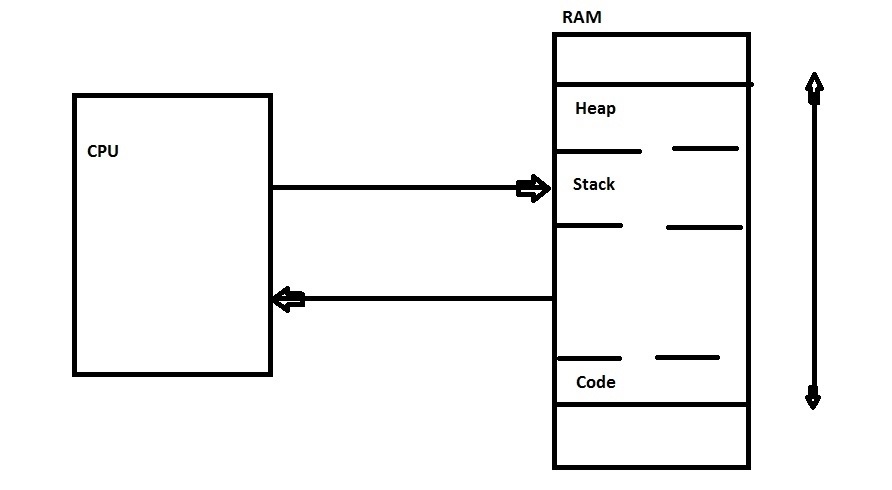
A simple diagram of how the CPU interacts with the RAM.
A program can be run by executing a file such as:
notepad.exe
The operating system will allocate some area in the RAM for the program to be run. The code of the exe ( machine language instructions ) will occupy some space and 2 sections in the RAM will be reserved ; the stack and the heap.
When a program is run the CPU will fetch an instruction from the RAM and process it and then fetch another instruction from the RAM and process it . Complications arise when there is a function to be called.
Assume the following are machine language instructions loaded in the RAM .
	   int sum( int x1 , int x2 )   //A

			  return ( x1 + x2 )     //B

	   int main()

			 int result ;  //C

			 result  = sum( 4 , 6 ) ;    //D
Assume the current instruction is at "C". Now we need to execute the function "sum" but the "sum" is another section of the code. Somehow we need to tell that function that once we are done we need to come back to the main function. So we store this location on the stack.
	  Stack

	   ---------

	   //D Store this location
Now we also need to pass the values 4 and 6 to the function . So let's store those also in the stack.
	  Stack

	   ---------

		  6

		  4

	   //D Store this location
Now we tell the CPU that the next instruction is A and we store 4 and 6 on the stack. Now the CPU starts executing the code at the location "sum" and the sum function grabs the numbers 4 and 6 and has the result 10 that it needs to give back to where the function was called in the "main" function. How does it do that ? Again it puts it on the stack:
	  Stack

	   ---------

	  10
It uses the //D location and control is transferred to the main function where the code picks up the result 10 from the stack and and assigns it to the variable "result" . The area for storing this information for a particular function is called a stack frame. Local variables are also created and stored on the stack.
Ex:

	void function1()

	{

		int x1 ;

		int x2 ;

		int x3 ;

	 }

	 Stack

	 ---------

	  x3

	  x2

	  x1
The requirement is that the size of the variables must be known at compile time of the variables to be allocated on the stack.
The "heap" is used to store memory that has been created dynamically when the program is run. The size of the memory can be dynamic. There are 2 functions that can be used to do this:
"malloc" and "new"
Memory allocated in any other way will be allocated on the stack. When the program exits or is terminated by the user then the whole block of memory is released by the operating system.
Person personObj1 = new Person() ;

Also note that when "new" is called the reference is stored
in the "personObj1" variable. The reference can be thought of
as a handle to the actual object created on the heap.
If we now do something like:

Person personObj2 = personObj1 ;

Only the reference/handle is copied not a copy of the object
in the heap.
File: Scope.java
public class Scope
{
   public void method1(  )
   {
       int x1 ;
       int x2 ;
       //Block scope
       {
          int x3 ;
          {
           int x4 ;

           //int x2
           //Error Java does not allow hiding of variables
          }
          //x4 is out of scope
       }
       //x3 is out of scope.
       // x3 = 5 compiler error
      Scope scopeObject = new Scope() ;
      //x1 and x2 about to go out of scope
      //scopeObject about to go out of scope
      //However the obhect still exists in the heap
   }

   public static void main( String args[] )
     {

     }

}
We can use the curly brackets to group statements and any variables defined in that block are limited to that scope. Any variables defined in a function will go out of scope when the function ends. If we define an object on the heap ( anything defined with new will be always allocated on the heap ) will stay around till the Garbage Collector runs. However if we don't have a reference then we cannot access that object as the above example shows.
Exercise 7)
Run the below programs and explain the output.
File: OutOfStack1.java
import java.util.* ;

public class OutOfStack1
{

     public static void method1()
      {
        int x1 = 10 ;
        int x2 = 10 ;
        int x3 = 10 ;
        method1() ;
      }

    public static void main(String[] args)
    {
        method1() ;
    }

}

C:\WebSite\Learn\2\Java\intro>java OutOfStack1
Exception in thread "main" java.lang.StackOverflowError
        at OutOfStack1.method1(OutOfStack1.java:11)
File: OutOfStack2.java
import java.util.* ;

public class OutOfStack2
{

     public static void method1()
      {
        int x1 = 10 ;
        int x2 = 10 ;
        int x3 = 10 ;
      }

    public static void main(String[] args)
    {
        while( true )
           method1() ;
    }

}

C:\WebSite\Learn\2\Java\intro>java OutOfStack2
Terminate batch job (Y/N)? Y
File: OutOfHeap.java
import java.util.* ;

public class OutOfHeap
{
   int arr1[] = new int[100000] ;
    public static void main(String[] args)
    {
        Vector<OutOfHeap> v1 = new Vector<OutOfHeap>() ;
        while( true )
         {
           v1.add( new OutOfHeap() ) ;
         } //while
    }

}

C:\WebSite\Learn\2\Java\intro>java OutOfHeap
Exception in thread "main" java.lang.OutOfMemoryError: Java heap space
        at OutOfHeap.(OutOfHeap.java:5)
        at OutOfHeap.main(OutOfHeap.java:11)
Exercise 7): Explain how the memory works in the below program.
File: Memory.java
class Person
{
    String firstName ;
    String lastName ;
}

public class Memory
{
    public static void method1()
    {
        int x1 ;
        int y1 ;
        x1 = 10 ;
        Person personObj1 = new Person() ;
    }

    public static void main(String[] args)
    {
          method1() ;
          //What are the variables for which memory has
          //been released at this point ?
    }

}
In the above case by the time "method1" has finsihed execution "personObj1" has gone out of scope and the memory can be reclaimed. But Java has no calls for us to "delete" the memory manually. This is where the "Garbage Collector" comes into play.The JVM has a process that periodically will check all the objects that have gone out of scope and will clean up the memory from the heap. We do not have control over how or when it runs. We can give the JVM a nudge to run the Garbage Collector with the command "System.gc()" but
File: OutOfHeap1.java
import java.util.* ;

public class OutOfHeap1
{

    @Override
    protected void finalize() throws Throwable {
        try {
            System.out.println("Finalize method called for object: " + this.toString());
        } finally {
            // It is good practice to call super.finalize()
            super.finalize();
        }
    }

    public static void main(String[] args) throws Throwable
    {
        // Create an object and make it eligible for garbage collection immediately
        for( int i1=0 ; i1<100 ; i1++ )
          new OutOfHeap1();

        // Suggest the JVM to run the garbage collector.
        // This is a *suggestion* only, not a command.
        System.gc();

        System.out.println("main method finished. Finalizer may or may not run before program exit.");

        // Keep the main thread alive for a moment to give the GC a chance (optional)
        try
        {
            Thread.sleep(2000);
        }
        catch (InterruptedException e)
        {
            e.printStackTrace();
        }
    }
}

C:\WebSite\Learn\2\Java\intro>java OutOfHeap1
main method finished. Finalizer may or may not run before program exit.
Finalize method called for object: OutOfHeap1@31f1b092
Finalize method called for object: OutOfHeap1@3f3658dc
Finalize method called for object: OutOfHeap1@3b09dbe2
Finalize method called for object: OutOfHeap1@7e0b52e7
...

We can control the heap size through command line parameters:

java -Xms12m -Xmx16m OutOfHeap1

The "-Xms" is stating allocate 12 MegaBytes as a minimum and
16 MegaBytes for the maximum heap size.

Similarly we can also specify the stack size :

java -Xss2m OutOfHeap1
Note that "finalize" method has been deprecated and there are better ways to run a method of a class that is about to be garbage collect. We used "finalize" for simplicity in the above example.
OOP
Let's discuss some basic OOP concepts. Java is a pure object oriented language. That means we cannot have global variables or global functions. All the code must be in a class.File: Global.java
int sum( int x1, int x2 )
 {
     return x1 + x2 ;
 }

int x1 ;

public class Global
{

    public static void main(String[] args)
    {

    }

}
What's the issue with the above code.
Encapsulation and Abstraction
Encapsulation refers to the class's ability to hold data members and methods. The class should havethe ability to hide those variables from outside the class. Abstraction refers to the class having public methods so that the user of the class can interact with it.File: Encapsulation1.java
/*
 Class Person has data members and methods
*/
class Person
{
    public int age ;
    public String firstName ;
    public String lastName ;
    public void printName( )
      {
        System.out.println( firstName + " " +
             lastName ) ;
      }
}

public class Encapsulation1
{

    public static void main(String[] args)
    {
       Person personObject = new Person() ;
       personObject.age = 250 ;
       System.out.println( personObject.age )  ;
    }

}

C:\WebSite\Learn\2\Java\intro>javac Encapsulation1.java

C:\WebSite\Learn\2\Java\intro>java Encapsulation1
250
We allowed the "age" data member to be accessed in a public way and now that it is exposed it can have an invalid value as the above example shows.
File: Encapsulation2.java
/*
 Class Person has data members and methods
*/
class Person
{
    //Nobody from outside the class
    //can access it directly. They are foced
    //to use the public method setAge()
    private int age ;
    public String firstName ;
    public String lastName ;

    public int getAge()
     {
       return age ;
     }

    public void setAge( int ageP )
      {
         if ( ageP < 0 && age <= 150 )
           age = ageP ;
         else
           System.out.println(
               "Please Enter a valid value for age.") ;
      }
}

public class Encapsulation2
{

    public static void main(String[] args)
    {
       Person personObject = new Person() ;
      //  Can't do. Compiler error.
      // personObject.age = 250 ;
       personObject.setAge( 250 ) ;
    }

}

C:\WebSite\Learn\2\Java\intro>javac Encapsulation2.java

C:\WebSite\Learn\2\Java\intro>java Encapsulation2
Please Enter a valid value for age.
The above shows a better way. The "age" data member is hidden so if we try to access it directly we get a compiler error. We must use the "setAge" function and we can check for the validity at that point. The process of a class's ability to contain and hide data members is called Encapsulation and the public method that a class can expose falls in the area of Abstraction. Both of these are important for OOP.
Inheriitance
File: Inheritance.java
class Vehicle
{
  float weight ; //in pounds
  String typeOffuel ; //electric petrol diesel
  int topSpeed ; //mph
}

class Train extends Vehicle
{
    int numberOfCarriages ;
}


public class Inheritance
{
    public static void main( String args[] )
     {
       Train trainObject = new Train() ;
       //train has Vehicle's properties also
       trainObject.topSpeed = 90 ;
       Vehicle vehicleObject =  trainObject ;
       //A train object is also a vehicle object
     }

}
Say we have a "Vehicle" class that has certain attributes Ex: "weight", "top speed", "type of fuel" . Now we want to design a "Train" class that also has the same attributes because a "Train" also has "weight", "top speed" and so on. In this case we could place these properties in the "Train" class but why not just inherit the "Vehicle" class and we get those properties for free in our "Train" class. Conceptually a train object is also a vehicle and we can create a variable of type vehicle and assign a train object to it. A class can only derive from 1 class. We do not have the concept of multiple inheritance in Java.
Polymorphism
The word means "taking many forms" but that does not tell us much. Polymorphism is best explained by an example. We will rely upong the usual "Shape" example.File: Poly.java
class Shape
{
  void draw()
   {
       System.out.println("Shape") ;
   }
}

class Rectangle extends Shape
{
  void draw()
   {
       System.out.println("Draw Rectangle.") ;
   }
}


class Circle extends Shape
{
  void draw()
   {
       System.out.println( "Draw Circle.") ;
   }
}


public class Poly
{

    public static void main(String[] args)
    {
        Shape  shapeObject = new Rectangle() ;
        //Which method gets called.
        // the one for the Shape or the one for the
        //Rectangle
        shapeObject.draw() ;
    }

}

C:\WebSite\Learn\2\Java\intro>java Poly
Draw Rectangle.

		Shape  shapeObject = new Rectangle() ;
		//Which method gets called.
		// the one for the Shape or the one for the
		//Rectangle
		shapeObject.draw() ;

We can assign a "Rectangle" object to the Base class "Shape".
Both the classes have the same method "draw". Which one
gets called ? The "shapeObject" has the underlying object
"Rectangle" and so when we do:

shapeObject.draw() ;
The "Rectangle's" draw() method gets called in this case. Well what's the big deal here ? It turns out this feature plays an important role in OOP. Let's assume we are designing a "MS Paint" like application. We have some shapes that the user can select to draw on a area in the app. We want to design a general scheme like the below:
                             General code
                       Pass in a shape object
                       Code draws the specific shape
                        on the canvas.
                       We can color this shape, delete it
                       and so on.
Existing shape
Rectangle
Circle
Now we get a new requirement to allow the user to draw another
shape say "oval" . We don't touch the "General code" section
but instead define a new class "Oval" and override the "draw"
method, upcast it to a base class and then simply plug it in the
General code. It is one thing to know the syntax of the language
and write code that does the job and it is another thing to
know good Object Oriented design principles to write elegant
programs.
Composition
Composition is the ability for 1 class to include ( as a data member ) an object of another class. The below code is an example.File: Composition.java
class Engine
{
    int noOfCyclinders ;
    int engineCapacity ;
}

class Car
{
    Engine engineInTheCar ;
    String Make ;
    String Model ;
    int noOfDoors ;

}


public class Composition
{

    public static void main(String[] args)
    {
        Engine engineObject = new Engine() ;
        engineObject.noOfCyclinders = 4 ;
        engineObject.engineCapacity = 1400 ;
        Car  carObject = new Car() ;
        carObject.engineInTheCar = engineObject ;
        System.out.println("No of cylinders in the engine in car: " +
              carObject.engineInTheCar.noOfCyclinders     ) ;
    }

}

C:\WebSite\Learn\2\Java\intro>java Composition
No of cylinders in the engine in car: 4